


Lancer un nouveau site web peut être à la fois excitant et écrasant. Vous y avez consacré des heures de travail, mais voici la partie difficile : faire en sorte que les gens viennent réellement.
J'ai lancé pas mal de sites au fil des ans. Certains ont échoué, d'autres ont décollé. La différence ne venait pas du design ou du produit. C'était le plan. Avoir un plan marketing de lancement clair a fait toute la différence.
C'est pourquoi j'ai commencé à utiliser ce que j'appelle le Plan de Lancement de Site Web 3P. Il divise votre lancement en trois étapes simples : Planifier, Promouvoir et Pousser vers l'avant.
Dans ce guide, je vais vous expliquer comment créer un plan marketing de lancement de site web en utilisant cette méthode. Que vous lanciez votre premier site ou que vous souhaitiez simplement de meilleurs résultats cette fois-ci, vous apprendrez exactement quoi faire avant, pendant et après le jour du lancement.
Que contient un plan marketing de lancement de nouveau site web ?
Aperçu du Plan de Lancement de Site Web 3P
Tout d'abord, voici le processus que je suis pour planifier le lancement de mon site web :
| Phase | Objectif | Actions Clés |
|---|---|---|
| Planifier | Poser les bases | Définir les objectifs, définir le public, créer un calendrier de contenu, préparer le SEO |
| Promouvoir | Créer de l'anticipation | Campagnes d'e-mails, page "bientôt disponible", teasers sur les réseaux sociaux, relations presse |
| Pousser vers l'avant | Lancer et grandir | Annoncer le site, suivre les performances, continuer le contenu et la promotion |
Calendrier de lancement de site web en un coup d'œil
Voici le calendrier typique que je suis lors du lancement d'un nouveau site web :
| Phase | Objectif principal | Chronologie |
|---|---|---|
| Pré-lancement | Objectifs, SEO, page teaser, liste d'e-mails, contenu promotionnel | 2–4 semaines avant le lancement |
| Semaine de lancement | Annonces, coup de pouce sur les réseaux sociaux, campagne d'e-mails, relations publiques | Jour de lancement + 7 jours |
| Après le lancement | Surveiller le trafic, mettre à jour le contenu, continuer la promotion | 1 à 4 semaines après le lancement |
Ce que j'ai appris de mes propres lancements de sites Web
J’ai lancé de nombreux sites WordPress pour des clients et pour moi-même. Voici ce qui a distingué les lancements qui ont fonctionné de ceux qui n’ont pas fonctionné :
- Ne pas avoir de liste d'e-mails signifie partir de zéro. J'ai mis en place une page « Prochainement » quatre semaines avant un lancement et j'ai collecté plus de 200 e-mails d'abord. Comparez cela à un lancement précédent où j'ai sauté cette étape et obtenu presque aucun trafic le premier jour. La liste a fait toute la différence.
- Une page « Prochainement » fait plus que collecter des e-mails. En utilisant SeedProd, j'en ai créé une avec un compte à rebours et un formulaire d'inscription. Elle a également permis à mon domaine d'être indexé par Google avant la mise en ligne du site, donc je ne partais pas de zéro avec le référencement le jour du lancement.
- Les annonces n'atteignent qu'une audience réceptive. Les publications le jour du lancement n'ont presque aucun impact, sauf si vous avez teasé le lancement sur les réseaux sociaux et par e-mail pendant au moins deux semaines auparavant.
- Fixez des objectifs avant le lancement, pas après. Un objectif spécifique, comme 500 visiteurs en 30 jours ou 50 inscriptions à la newsletter, vous indique si le lancement a réussi et vous donne quelque chose de concret à améliorer la prochaine fois.
Comment créer un plan marketing pour le lancement d'un nouveau site Web ?
Comme nous l'avons établi, un lancement de site Web impressionnant nécessite un plan solide. Alors, sans plus tarder, plongeons et créons ensemble votre plan marketing pour le lancement de votre nouveau site Web.
Si vous n'avez pas encore construit votre site, ce guide de création de site Web pour débutants vous accompagne pendant un week-end.
- Définissez vos objectifs et votre public cible
- Auditez vos canaux marketing actuels
- Créez un calendrier de contenu
- Optimisez votre site Web pour les moteurs de recherche
- Commencez à promouvoir votre site Web avant le lancement
- Suivez votre liste de contrôle pré-lancement
- Lancez votre site Web en fanfare
- Suivez vos résultats
- Configurez ou mettez à jour votre profil d'entreprise Google
Définissez vos objectifs et votre public cible
C'est la première étape de la phase de planification. Elle pose les bases d'un lancement réussi.
Visez-vous un nombre spécifique de visiteurs sur le site Web ? Ou souhaitez-vous augmenter les ventes de produits ou les inscriptions à la newsletter ?
Fixez 1 à 3 objectifs de lancement mesurables avant de commencer la promotion. Objectifs courants : 500 visiteurs uniques la première semaine, 100 abonnés à la newsletter avant la mise en ligne, ou 10 prospects qualifiés le premier mois. Un chiffre précis vous indique si votre lancement a réussi et ce qu'il faut ajuster la prochaine fois.
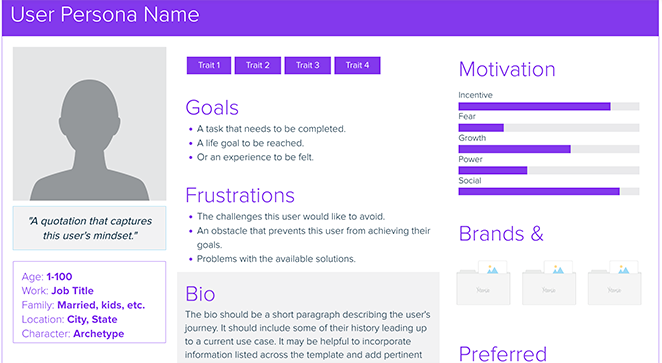
Comprendre votre public cible est tout aussi important. Demandez-vous qui bénéficierait le plus de votre produit ou service et quel type de contenu les maintiendrait engagés.
Vous devrez peut-être mener une étude de marché ou créer des personas clients pour vous aider à répondre à ces questions. Voici un exemple de modèle de persona de Xtensio qui aide à en générer un rapidement :
Auditez vos canaux marketing actuels
Si vous n'avez pas encore commencé, vous pouvez consulter ce guide pour apprendre comment commencer à créer une liste d'e-mails.
Créez un calendrier de contenu
Une fois vos objectifs et votre stratégie clairs, votre calendrier de contenu devient le ciment qui maintient la phase de planification.
Utilisez un calendrier de contenu pour planifier et organiser votre promotion. Il indique ce que vous allez publier et quand, afin que rien d'important ne soit oublié avant le lancement.
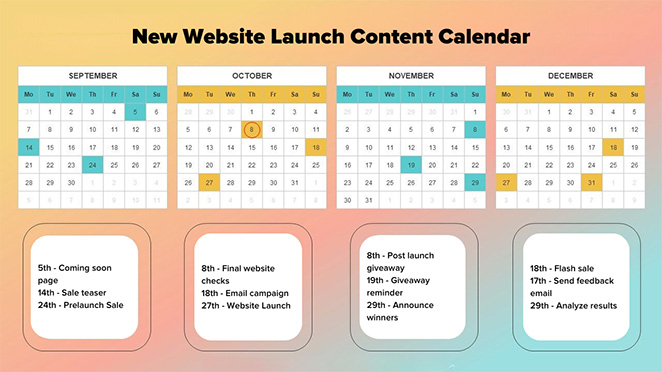
Voici quelques étapes pour créer un calendrier de contenu efficace :
- Sélectionnez le type de contenu que vous prévoyez de publier : Cela peut aller des articles invités sur d'autres sites Web, aux newsletters par e-mail, aux mises à jour sur les réseaux sociaux, aux podcasts, aux webinaires ou aux vidéos. Assurez-vous que les types de contenu correspondent à la voix de votre marque et plaisent à votre public.
- Identifiez les dates et jalons clés : Ceux-ci peuvent inclure des lancements de produits, des périodes de soldes, ou des fêtes ou événements pertinents. Planifiez votre contenu pour tirer parti de ces opportunités.
- Établissez un calendrier de publication : Décidez de la fréquence et des jours de publication de votre contenu. Vous pouvez publier plus fréquemment avant le lancement du site Web pour susciter l'anticipation.
- Attribuez les rôles : Choisissez qui est responsable de la création, de la modification, de l'approbation et de la distribution du contenu pour vous assurer que tout reste sur la bonne voie.
Optimisez votre site Web pour les moteurs de recherche
Si vous voulez que les gens trouvent votre site Web, il doit apparaître dans les résultats de recherche. C'est là qu'intervient l'optimisation de votre site Web pour les moteurs de recherche.
Ceci est connu sous le nom d'optimisation pour les moteurs de recherche (SEO), et c'est essentiel au succès du lancement de votre site Web. C'est l'un des meilleurs moyens de générer du trafic organique vers votre site.
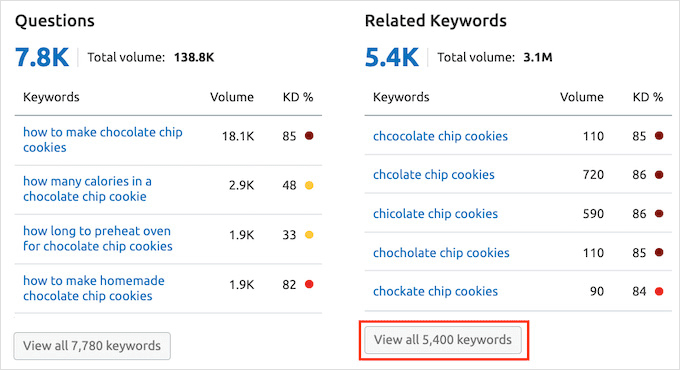
Pour commencer, effectuez une recherche de mots-clés, en trouvant les mots et expressions que les utilisateurs utiliseront probablement en vous recherchant. Ensuite, ajoutez des mots-clés pertinents dans des endroits stratégiques de votre site, tels que dans vos balises méta, votre page d'accueil, vos titres et votre contenu.
Le bourrage de mots-clés peut nuire à votre classement. Concentrez-vous sur la pertinence et l'utilité réelle, pas sur la fréquence des mots-clés.
Abordez également le côté technique : structure du site, URL propres, sitemap et optimisation mobile. La plupart des visiteurs arrivent sur un téléphone, donc la compatibilité mobile est non négociable.
Enfin, commencez à créer des backlinks. Les articles invités, les partenariats avec des influenceurs et le contenu véritablement utile sont les moyens les plus fiables d'en obtenir.
Pour plus d'aide, veuillez consulter notre guide sur comment classer un nouveau site Web.
Commencez à promouvoir votre site Web avant le lancement
Il est maintenant temps de passer à la phase de promotion de votre lancement, où vous suscitez l'enthousiasme et générez un intérêt précoce.
Tout d'abord, envisagez d'ajouter une page de destination « Bientôt disponible » à votre site Web. C'est l'un des outils les plus efficaces de la phase de promotion, surtout si vous créez une liste d'e-mails. Même si votre site n'est pas encore en ligne, cette page peut capter l'intérêt précoce et permettre aux visiteurs de s'inscrire pour recevoir des mises à jour.

Promouvez cette page via vos canaux marketing existants pour informer votre public que quelque chose d'excitant arrive.
Astuce
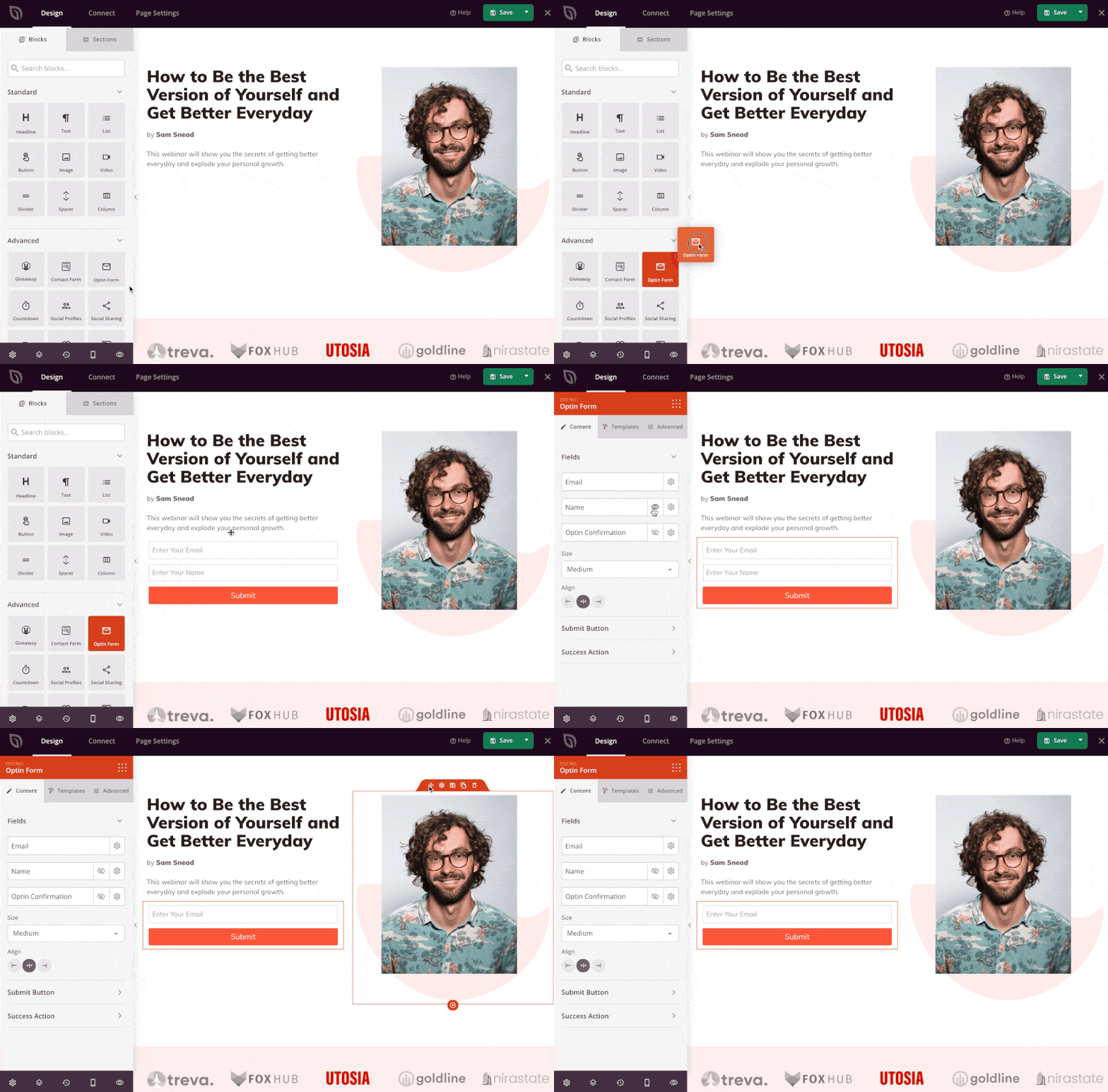
Vous pouvez créer une page "Bientôt disponible" à fort taux de conversion en quelques minutes avec SeedProd. Glissez-déposez simplement des blocs comme des formulaires d'inscription, des comptes à rebours ou même un cadeau, sans coder.
Voici à quoi cela ressemble en utilisant le constructeur par glisser-déposer :
Vous pouvez également personnaliser votre formulaire d'inscription pour commencer à collecter des e-mails immédiatement :
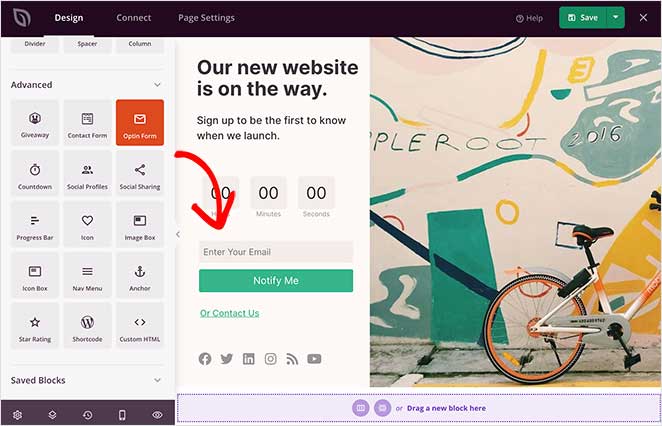
SeedProd s'intègre aux fournisseurs d'e-mails populaires comme Mailchimp, Constant Contact et Drip, vous permettant ainsi de développer automatiquement votre liste avant le lancement.
Ensuite, utilisez la puissance de vos plateformes de médias sociaux pour annoncer le lancement de votre site Web et partager des aperçus passionnants. La création de publications teaser et l'offre d'aperçus exclusifs peuvent maintenir l'intérêt de votre public et le faire attendre avec impatience les débuts de votre site Web.
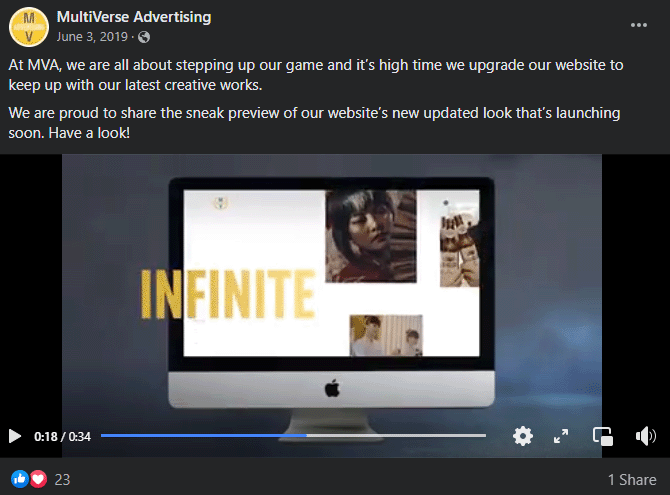
Le marketing par e-mail est un autre excellent moyen de promouvoir votre site Web.
Créez une campagne d'e-mails, en fournissant aux abonnés des informations privilégiées et des avantages exclusifs. Vous pourriez même donner à votre liste d'e-mails un accès anticipé au site Web ou des offres spéciales pour susciter l'anticipation.
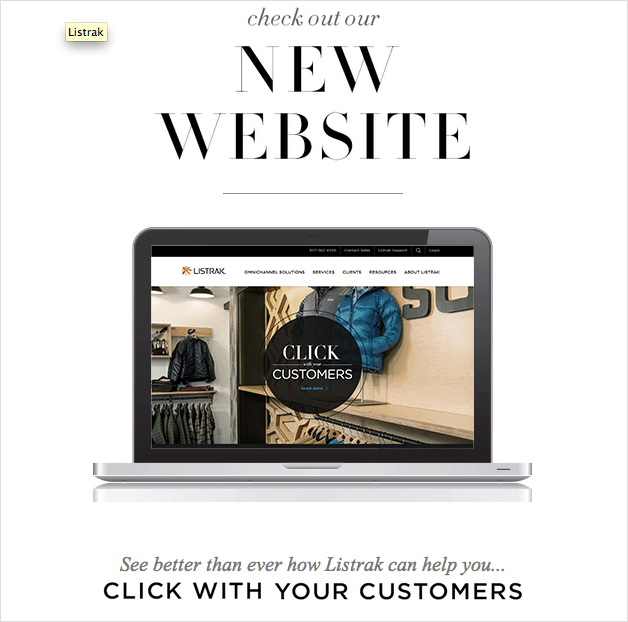
Enfin, contactez les médias et les blogueurs de votre secteur. Une seule mention ou un seul article d'une source populaire peut accroître votre visibilité. Créez un communiqué de presse ou un kit média convaincant les encourageant à partager des nouvelles sur votre lancement imminent.
Suivez votre liste de contrôle pré-lancement
Avant d'appuyer sur le bouton de lancement, parcourez une liste de contrôle de pré-lancement couvrant les aspects techniques de votre site Web.
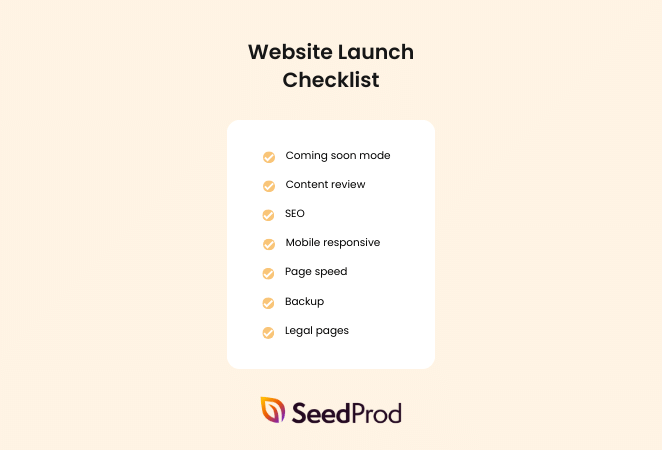
Cela pourrait inclure des tâches telles que :
- Perfectionner votre conception Web
- Finaliser votre développement Web
- Tests de fonctionnalité inter-navigateurs et inter-appareils
- Vérifier les liens du site Web pour les erreurs
- S'assurer que les plugins WordPress fonctionnent correctement
- Télécharger les produits e-commerce
Un site Web bien optimisé devrait non seulement attirer, mais aussi retenir les visiteurs. Ainsi, inspectez vos temps de chargement et assurez-vous qu'ils sont suffisamment rapides, même pour ceux qui ont une connexion Internet lente. Vous devriez également vous assurer que votre site est entièrement optimisé pour les appareils mobiles.
Confirmez que vos formulaires, tels que les formulaires de contact, d'inscription ou d'achat, fonctionnent parfaitement et sont faciles à utiliser. De plus, ayez une politique de confidentialité claire et facile à comprendre disponible pour tous vos utilisateurs.
Pour une liste complète des éléments, consultez notre liste de contrôle en 24 points pour un lancement de site Web WordPress réussi.
Lancez votre site Web en fanfare
Le grand jour est arrivé. C'est la phase "Push Forward", où votre travail de pré-lancement porte ses fruits.
Commencez par une annonce de lancement qui communique clairement ce que fait votre site et à qui il s'adresse.

Cela pourrait être un communiqué de presse, un article de blog, une campagne d'e-mails ou une annonce vidéo. L'objectif est de susciter la curiosité et l'intérêt, menant les lecteurs à votre site Web.
Besoin d'inspiration ? Consultez notre guide sur comment rédiger un e-mail d'annonce de nouveau site Web.
Ensuite, partagez des annonces sur tous vos canaux marketing, tels que LinkedIn, Facebook et X (anciennement Twitter). Vous vous souvenez de ces canaux que vous avez identifiés et optimisés ? Il est temps de les mettre au travail.
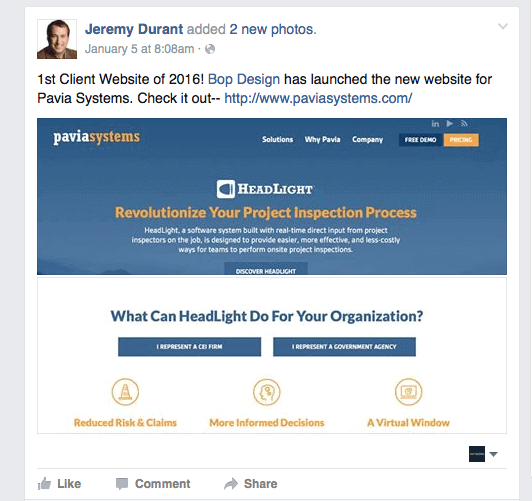
Qu'il s'agisse des réseaux sociaux, des newsletters par e-mail ou des partenariats avec des influenceurs, assurez-vous que votre message de lancement de site Web est présent partout où votre public cible interagit.
Google Analytics suit le comportement des utilisateurs, d'où viennent les visiteurs, quelles pages ils visitent et où ils abandonnent. Google Search Console montre quelles requêtes de recherche génèrent du trafic et signale les erreurs d'indexation. Ensemble, ils vous donnent une image complète des performances de votre lancement.
Je le considérerais comme un coup de pouce de lancement plutôt qu'une stratégie à long terme, mais c'est particulièrement utile si votre trafic organique prend du temps à se développer. Consultez notre guide sur la création d'une page de destination à forte conversion pour vous assurer que vos publicités envoient les gens vers un endroit qui en vaut la peine.
Vous voulez rendre votre lancement encore plus excitant ? Envisagez d'organiser une promotion, comme un cadeau ou un concours. Ces tactiques peuvent susciter l'intérêt et générer plus de trafic vers votre nouveau site.
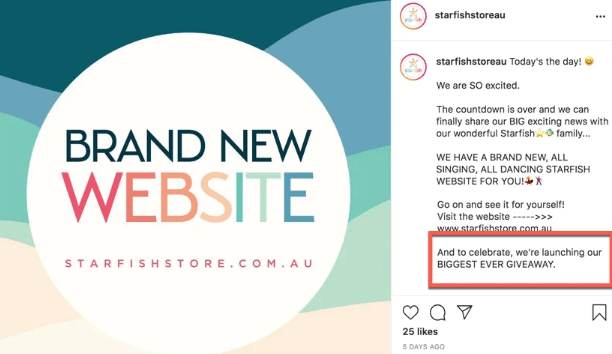
Même offrir une réduction spéciale sur vos produits ou services pendant une période limitée est un énorme attrait.
Astuce de lancement
Vous voulez que davantage de personnes voient votre lancement ? Essayez d'organiser un cadeau en utilisant SeedProd et RafflePress. C'est une combinaison puissante qui vous permet de constituer votre liste, de récompenser les premiers fans et de susciter le partage viral, avant même que votre site ne soit en ligne.
Vous pouvez ajouter un bloc de cadeau directement à votre page "Prochainement" :
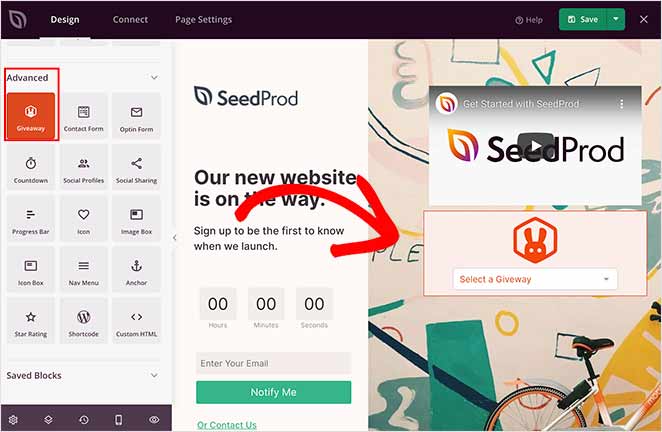
Choisissez ensuite votre campagne dans le menu déroulant :
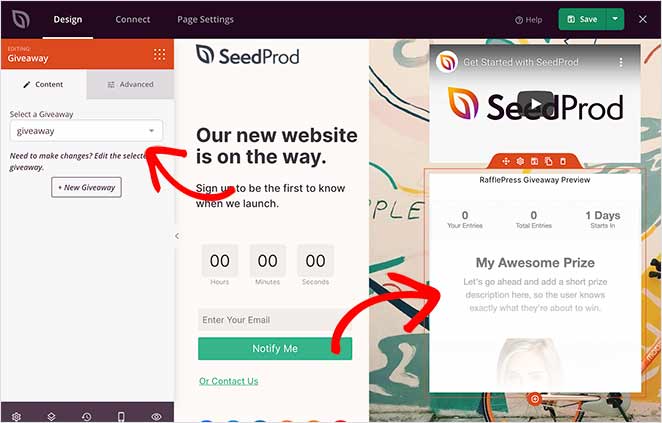
C'est un excellent moyen de transformer les premiers visiteurs en défenseurs enthousiastes de la marque et de développer votre audience avant même le jour du lancement.
Suivez vos résultats
Maintenant qu'il est en ligne, surveillez les analyses de votre site Web pour suivre ses performances. C'est là que la phase "Push Forward" (Pousser vers l'avant) prend tout son sens : vous ne lancez pas seulement, vous apprenez et vous vous améliorez en temps réel.
Le suivi de vos résultats au fil du temps fournira des informations pour vous aider à ajuster et à optimiser votre stratégie. Cela implique de surveiller le trafic du site Web, le comportement des utilisateurs et les taux de conversion.
Configurez deux outils avant le lancement, pas après : Google Analytics et Google Search Console.
Google Analytics suit le comportement des utilisateurs, d'où viennent les visiteurs, quelles pages ils visitent et où ils abandonnent. Google Search Console montre quelles requêtes de recherche génèrent du trafic et signale les erreurs d'indexation. Ensemble, ils vous donnent une image complète des performances de votre lancement.
Voici quelques conseils pour tirer le meilleur parti de vos analyses :
Qui visite votre site Web ? D'où viennent-ils ? Sur quelles pages passent-ils du temps ?
Voici les métriques clés à suivre au cours de vos 30 premiers jours, ce qu'elles vous disent et quand agir :
| Métrique | Ce que cela vous dit | Quand ajuster |
|---|---|---|
| Sessions / Utilisateurs | Combien de personnes trouvent votre site | Si moins de 100 sessions la première semaine, augmentez les canaux de promotion |
| Taux de rebond | Si les visiteurs restent ou partent immédiatement | Plus de 70 % sur les pages de destination clés signifie que le message ou la vitesse nécessite des améliorations |
| Taux d'inscription par e-mail | Dans quelle mesure votre offre de constitution de liste convertit | Moins de 1 % signifie qu'il faut revoir l'offre ou le placement de l'opt-in |
| Taux de conversion | Visiteurs accomplissant votre objectif principal (achat, contact, inscription) | Moins de 1 à 2 % pour un nouveau site justifient des tests avec différents CTA ou mises en page. |
| Principales sources de trafic | Quels canaux envoient réellement des visiteurs | Renforcez ce qui fonctionne ; réduisez le temps consacré à ce qui ne fonctionne pas |
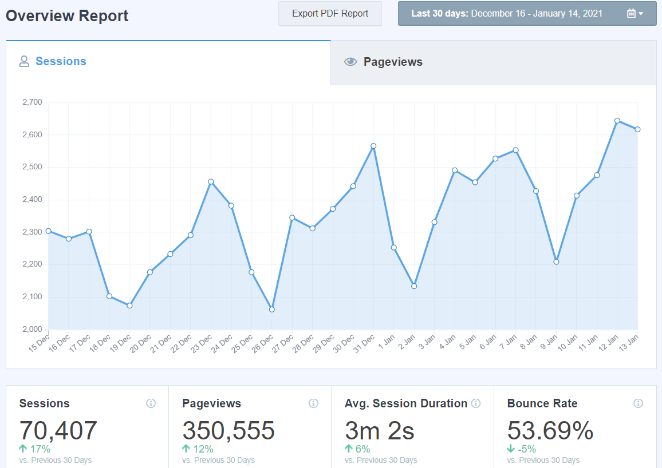
Dans l'exemple ci-dessus, nous avons utilisé MonsterInsights, le meilleur plugin Google Analytics pour WordPress, pour donner un sens à nos données.
Vous souvenez-vous des objectifs que vous vous êtes fixés au début de votre lancement ? C'est le moment de comparer vos résultats à vos attentes.
Comprendre vos résultats attendus par rapport à vos résultats réels peut vous aider à ajuster votre stratégie pour l'avenir.
Configurez ou mettez à jour votre profil d'entreprise Google
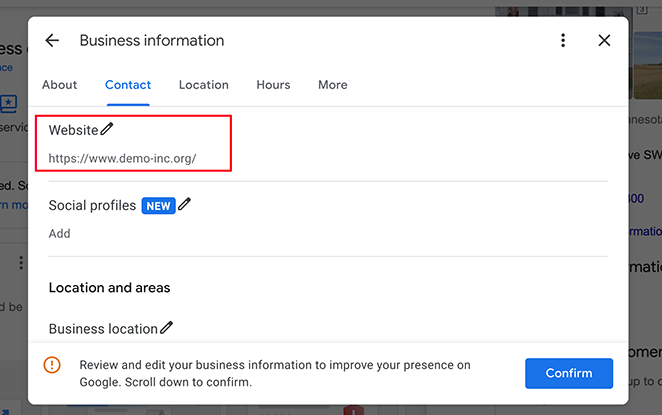
Une étape que de nombreux propriétaires de nouveaux sites négligent : mettre à jour leur fiche d'établissement Google avec la nouvelle URL juste après le lancement.
Si vous avez une entreprise locale, cela est plus important que la plupart des tactiques de lancement. Votre fiche d'établissement Google contrôle la façon dont votre entreprise apparaît dans Maps et dans les résultats de recherche locaux.
Accédez à Fiche d'établissement Google, mettez à jour le lien de votre site Web, ajoutez des photos de votre nouveau site ou de votre espace, et confirmez que les détails de votre entreprise sont à jour. Cela prend moins de 10 minutes et améliore directement votre visibilité locale.
La planification du lancement de votre site est cruciale. Si vous recherchez un exemple pratique, consultez notre tutoriel sur comment créer un site Web de mariage dans WordPress pour comprendre les stratégies efficaces en action.
FAQ sur le plan marketing de lancement d'un nouveau site Web
Combien de temps avant le lancement dois-je commencer à commercialiser mon site Web ?
Commencez à commercialiser votre site Web au moins 4 semaines avant le lancement. Mettez en place une page « Bientôt disponible » immédiatement afin que Google puisse commencer à indexer votre domaine et que vous puissiez commencer à collecter des adresses e-mail. Utilisez les semaines 2 à 3 pour teaser du contenu sur les réseaux sociaux et envoyer des e-mails de préchauffage à votre liste. Le jour du lancement, vous voulez un public préparé prêt à partager, pas un démarrage à froid sans personne pour regarder.
Comment puis-je constituer une liste d'e-mails avant le lancement de mon site Web ?
Mettez en place une page « Bientôt disponible » avec un formulaire d'opt-in par e-mail avant la mise en ligne de votre site. Offrez une incitation, comme un accès anticipé, une réduction ou une ressource gratuite, pour encourager les inscriptions. Des outils comme SeedProd vous permettent de créer une page « Bientôt disponible » en quelques minutes et de la connecter directement à des fournisseurs d'e-mails comme Mailchimp ou Constant Contact. Ensuite, faites la promotion de la page via vos profils de réseaux sociaux et tout public existant que vous avez.
Comment rédiger une annonce de lancement de site Web ?
Une bonne annonce de lancement de site Web explique ce qu'est votre site, à qui il s'adresse et ce qu'il y a de nouveau ou d'excitant à son sujet. Restez bref : un paragraphe pour un e-mail, deux ou trois phrases pour les réseaux sociaux. Commencez par ce que le lecteur obtient, pas par ce que vous avez construit. Incluez un lien direct vers le site et un appel à l'action clair, comme « découvrez-le » ou « profitez de l'offre d'accès anticipé ». Consultez notre guide sur comment rédiger un e-mail d'annonce de site Web pour des modèles et des exemples.
Ai-je besoin d'une page « Bientôt disponible » avant le lancement de mon site Web ?
Vous n’en avez pas besoin, mais cela fait une réelle différence. Une page « Bientôt disponible » vous permet de collecter des abonnés par e-mail, de susciter l’anticipation et de faire indexer votre domaine par Google avant le jour du lancement. Sans elle, vous partez de zéro : pas de liste, pas d’avance en référencement, et pas de public prêt à partager. Avec elle, le jour du lancement devient une campagne avec un élan plutôt qu’un début discret.
Combien coûte le lancement d’un site Web ?
Le coût dépend si vous engagez un développeur ou si vous le créez vous-même, et si vous lancez des publicités payantes. Un site Web d’entreprise conçu par un développeur coûte généralement entre 300 $ et plus de 1 000 $. Si vous utilisez un constructeur de thèmes WordPress, le coût est beaucoup plus bas. Consultez notre guide sur le coût de création d’un thème WordPress personnalisé pour plus de détails.
Que dois-je faire après le lancement d’un nouveau site Web ?
Après le lancement, soumettez votre site à la Google Search Console afin qu’il soit exploré et indexé. Configurez Google Analytics pour suivre le trafic, puis mettez à jour votre profil d’entreprise Google et vos profils de réseaux sociaux avec la nouvelle URL.
Faut-il faire du référencement avant ou après le lancement de votre site Web ?
Les deux. Avant le lancement, identifiez vos mots-clés cibles et intégrez-les dans la structure de votre site et le contenu de vos pages. Après le lancement, utilisez la Google Search Console pour surveiller les classements et optimiser au fur et à mesure que vous publiez du nouveau contenu.
Un plan de marketing de lancement solide est ce qui sépare les sites qui se font remarquer de ceux qui sont mis en ligne dans le silence. Travaillez à travers les phases Planifier, Promouvoir et Pousser en avant dans l’ordre, et vous aurez une base solide sur laquelle construire dès le premier jour.
Vous pourriez également trouver les guides suivants utiles pour le lancement de votre nouveau site WordPress :
- Meilleurs outils d'automatisation du marketing pour les petites entreprises
- Comment sécuriser votre site WordPress contre les pirates
- Comment créer une politique de confidentialité WordPress
- Exemples de messages de bienvenue sur un site Web pour engager les nouveaux visiteurs
- Comment créer une page de destination avant le lancement
- Comment créer une page de presse dans WordPress
Merci de votre lecture ! Nous serions ravis d'entendre vos réflexions, alors n'hésitez pas à rejoindre la conversation sur YouTube, X et Facebook pour plus de conseils et de contenu utiles pour développer votre entreprise.



