

TL;DR: 8 Email Unsubscribe Page Examples (And How to Build Your Own)
Most unsubscribe pages are a dead end. These 8 real examples show how to turn that exit into a second chance, and how to build your own in WordPress without code.
- SeedProd – Clean design with a re-engagement CTA linking to latest deals.
- Jean Scene – Animated GIF with a one-click resubscribe option.
- Email Uplers – Full preference center letting users adjust frequency and content type.
- HubSpot – Personal video message that appeals to emotion before they leave.
- Charity: Water – Humor-first video that turned a potential exit into viral engagement.
- Vimeo/Yankee Candle/Wistia – Granular controls, snooze options, and transparent frequency settings.
When someone clicks the unsubscribe link in your email, it usually feels like the end of the road. But it doesn’t have to be.
I’ve worked on email campaigns where a simple unsubscribe screen either lost people for good or gave them a reason to stay. An email unsubscribe page is a landing page that lets contacts opt out of your email list, but it’s also your last chance to convince them to stay or keep the relationship going another way.
In this guide, I’ll show you what makes a good email unsubscribe page, share real examples I’ve seen work, and walk you through how to build one for your own site without touching a line of code.
Note: Gmail launched its Subscription Center in mid-2025, making it easier than ever for subscribers to leave with a single tap. Some senders are seeing unsubscribe rates nearly double as a result. That makes a well-designed unsubscribe page more important now, not less.
- 8 Email Unsubscribe Page Examples at a Glance
- What to Include on an Unsubscribe Page
- Why Unsubscribes Are Good for Your List
- 8 Effective Email Unsubscribe Page Examples
- What Makes These Unsubscribe Pages Work
- Email Unsubscribe Page Mistakes to Avoid
- How to Create an Email Unsubscribe Page
- Frequently Asked Questions
8 Email Unsubscribe Page Examples at a Glance
| Brand | Strategy Used | Best For | Complexity |
|---|---|---|---|
| SeedProd | Re-engagement CTA with discount offer | SaaS and product brands | Simple |
| Jean Scene | Humor (GIF) + resubscribe button | Casual lifestyle brands | Simple |
| Email Uplers | Full preference center | B2B and agencies | Advanced |
| HubSpot | Emotional video + social media bridge | Content and inbound brands | Medium |
| Charity: Water | Viral humor video | Non-profits and cause brands | Medium |
| Vimeo | Granular email type selection | Product and media companies | Advanced |
| Yankee Candle | Email snooze / pause option | E-commerce with seasonal sends | Simple |
| Wistia | Frequency transparency + preference selection | B2B SaaS and content brands | Advanced |
What to Include on an Unsubscribe Page
You can do several things to convince users to change their minds about clicking the unsubscribe button. Here are a few things to include on your unsubscribe page to convince valuable subscribers to stay:
- Re-subscribe: Sometimes, users click the unsubscribe link by mistake. Including this on your email unsubscribe landing page can help you recover lost contacts quickly.
- Frequency: It could be a user doesn’t want to unsubscribe, but they’re getting too many emails. Use your unsubscribe page to let users change their email preferences and reduce how often they receive your emails.
- Personalization: Your content may not be offering the best value to specific users. Change that by letting users choose what you send to their inbox.
- Alternatives: If people genuinely don’t want your emails anymore, there are still other ways to stay in touch. You can include links to your social media profiles, so users can follow you to stay in the loop about new updates.
- Feedback form: A simple “why are you leaving?” survey captures insight and slows the exit decision. Even a one-question dropdown gives you data to improve future emails.
- Preference center link: Give subscribers a direct link to update their email frequency or content topics without unsubscribing. A preference center keeps people on your list who would otherwise leave just to reduce inbox noise.
Customizing your unsubscribe confirmation page gives you a final opportunity to connect before someone leaves your list completely.
Why Unsubscribes Are Good for Your List
It feels counterintuitive, but a clean unsubscribe process actually helps your email program. Here’s why losing some subscribers is better than keeping everyone.
- Better deliverability: Sending to disengaged contacts hurts your sender reputation. Removing them keeps your open rates healthy and your emails out of spam folders.
- Lower platform costs: Most email providers charge by subscriber count. A smaller, engaged list costs less than a large, inactive one.
- Legal compliance: Both CAN-SPAM (in the US) and GDPR (in Europe) require you to honor unsubscribe requests promptly. A clear, easy unsubscribe process protects you legally.
- Cleaner analytics: With disengaged subscribers removed, your open and click rates reflect actual interest, making it easier to make good decisions about your content.
- Trust signal: Making it easy to leave paradoxically makes people more likely to stay. Subscribers who feel trapped leave faster and angrier.
According to MailerLite’s 2025 Email Marketing Benchmarks report, the average unsubscribe rate is now 0.22%, up from 0.08% in 2024. The highest rates are in photo/video (0.40%) and restaurants (0.39%). The lowest are in legal (0.09%) and media/higher education (0.10%).
If your rate is above 0.5%, your list health and content relevance are worth reviewing.
8 Effective Email Unsubscribe Page Examples
Your unsubscribe page doesn’t need to be fancy to generate results. Here are some excellent email unsubscribe page examples for your inspiration.
1. SeedProd
| Strength | What SeedProd Does Well |
|---|---|
| Re-engagement CTA | Links to latest deals to spark interest before users leave |
| Clean design | Minimal layout keeps attention on the offer |
| On-brand experience | Matches SeedProd’s tone and visuals |
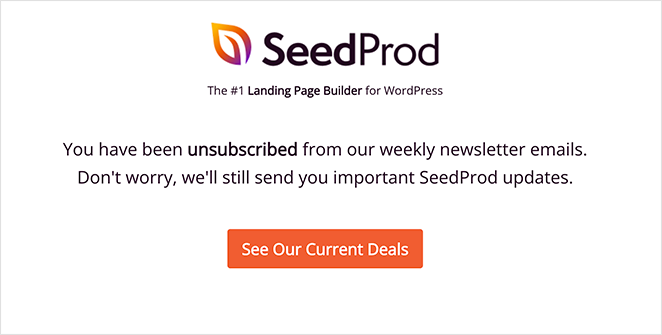
First is an email unsubscribe page from yours truly. At SeedProd, we wanted a way for people to unsubscribe from our weekly newsletter while continuing to get important product announcements.
We created a rule in our email marketing software that removes users from our newsletter list when clicking the unsubscribe link. The user will see the above unsubscribe screen after.
The design is clean and simple, and includes a call-to-action button inviting users to view SeedProd’s latest deals. This approach encourages users to re-engage with SeedProd, improving conversion rates.
This kind of unsubscribe experience works well when it feels intentional and helpful, not just a dead-end screen.
Pro Tip: We made this unsubscribe page with SeedProd’s landing page builder. We’ll show you how to create one later in this article.
2. Jean Scene
| Strength | What Jean Scene Does Well |
|---|---|
| Humor and personality | Animated GIF creates a memorable moment |
| Resubscribe option | Quick way to undo the unsubscribe |
| Simple layout | Keeps things casual and easy to understand |
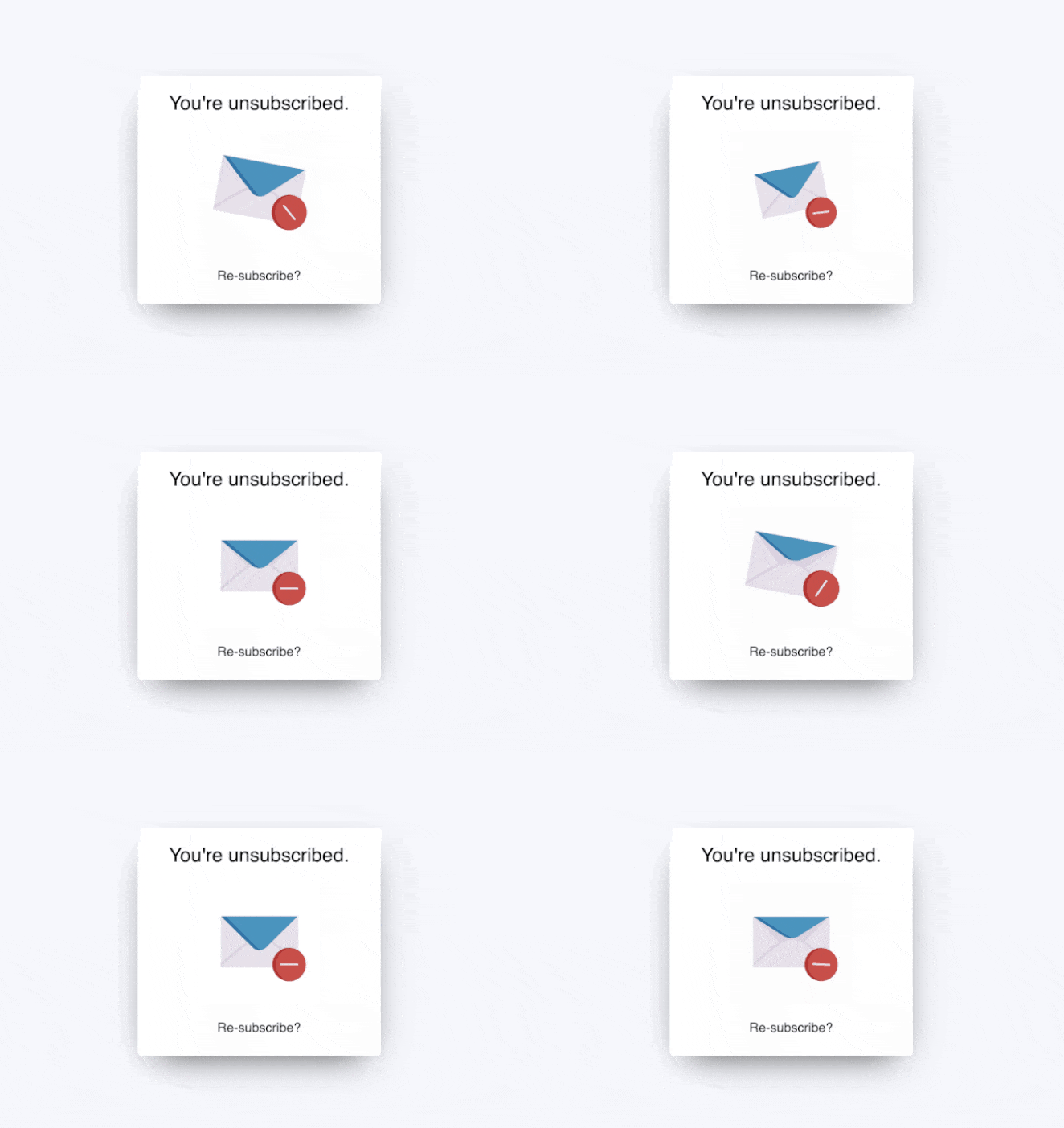
Here’s another simple email unsubscribe page from Jean Scene, the men’s jeans and fashion website. This example has even less information than the first but is still just as effective.
Users see a simple message telling them, “you’re unsubscribed.” Then it draws the eye with an engaging animated GIF and invites users to re-subscribe.
3. Email Uplers
| Strength | What Email Uplers Does Well |
|---|---|
| Full preference control | Users can change frequency and content types |
| Personalization | Page feels tailored to the subscriber |
| Clear choices | Empowers users instead of pushing them away |
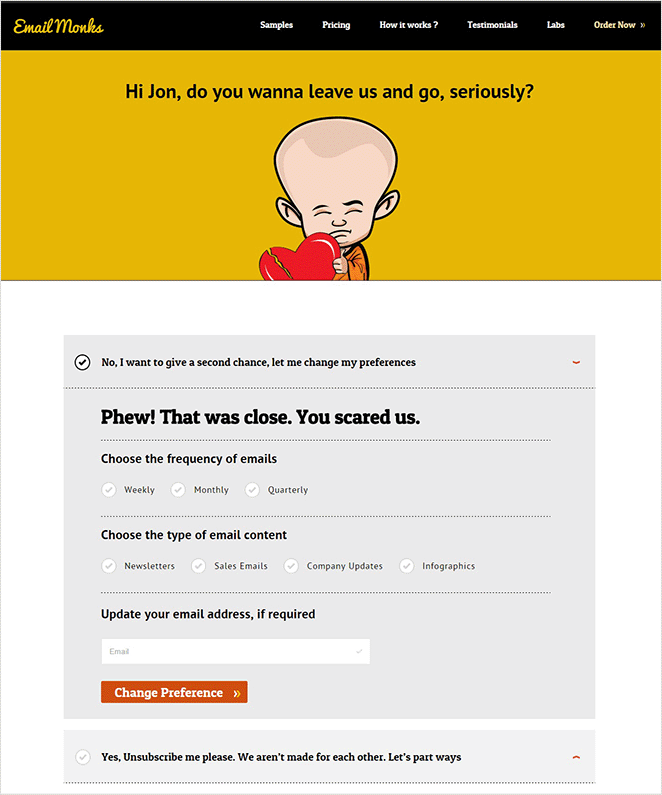
It’s no surprise that Email Uplers, a full-service email marketing agency, knows what it takes to create an effective email unsubscribe page. Their example includes many of the elements we mentioned earlier, including the ability to:
- Adjust email frequency
- Change the email content type
- Update your email address
- Unsubscribe completely
We also love that the page is personalized to the user. It gives the entire design a more authentic feeling, convincing you that Email Uplers genuinely values having you on their list.
4. HubSpot
| Strength | What HubSpot Does Well |
|---|---|
| Emotional connection | Personal video message acknowledges the user’s journey |
| Soft retention | Encourages staying in touch without pressure |
| Social follow options | Offers alternate ways to keep the relationship going |
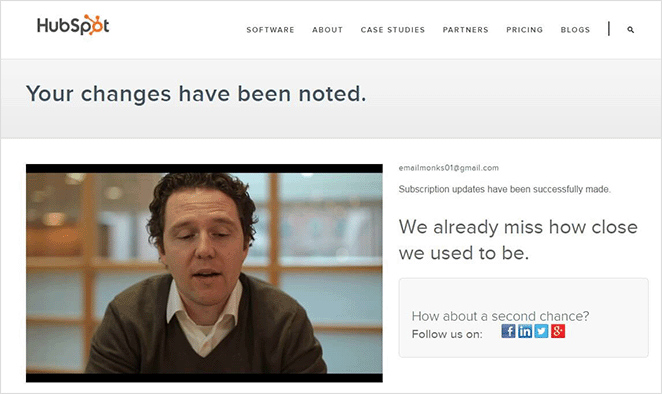
HubSpot clearly understands that some people don’t want their inboxes full of marketing messages. They demonstrate that on their email unsubscribe page with this emotional video message from their inbound marketing specialist:
Like a committed relationship, Dan reminds you of the good times, explains that he saw you open his emails, then follows up with a heartfelt plea to stay in touch. There are even links to HubSpot’s social media channels to back it up.
Sometimes, your audience just wants to feel valued. If you take a leaf out of HubSpot’s book and show some love, you’ll likely win users back.
5. Charity: Water
| Strength | What Charity: Water Does Well |
|---|---|
| Humor | Fun video makes the brand feel human |
| High engagement | Entertaining content keeps people watching |
| Unconventional approach | Stands out from typical email unsubscribe pages |
Charity: water, a non-profit clean water organization, also uses humor to engage users wanting to unsubscribe from their email list. Instead of showing a standard email unsubscribe page, users can either confirm they’re opting out or watch a video of the CEO getting water-bombed.
The results of this campaign were striking. The email was sent to over 70,000 people, and out of that, only 100 unsubscribed, and 740 watched the video.
Examples like this show that if it’s relevant to your brand, a little humor can go a long way in re-engaging and entertaining your audience.
6. Vimeo
| Strength | What Vimeo Does Well |
|---|---|
| Granular control | Lets users choose specific types of emails |
| Minimal design | Easy to scan and select without friction |
| Retention focus | Encourages adjustments over full unsubscribes |
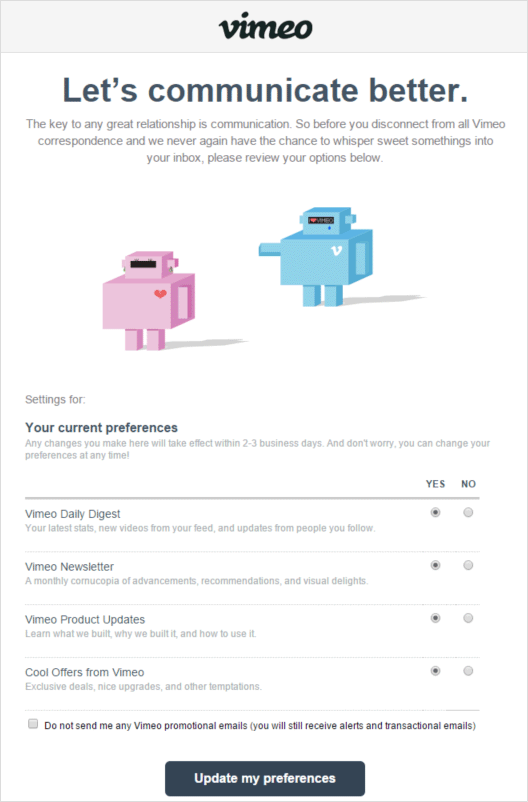
Vimeo’s unsubscribe page is another example of how you can free people from unwanted emails without causing them to unsubscribe. They focus on communication, inviting users to change their email preferences and choose which types of emails they’d like to receive.
The options are straightforward:
- Daily digest
- Newsletter
- Product updates
- Offers
The page also includes a checkbox for users to opt-out of all promotional emails and only receive alerts and transactional emails.
7. Yankee Candle
| Strength | What Yankee Candle Does Well |
|---|---|
| Smart timing control | Pause option respects seasonal email fatigue |
| Subtle retention | Reduces opt-outs without being pushy |
| Great for reactivation | Brings users back without extra work |
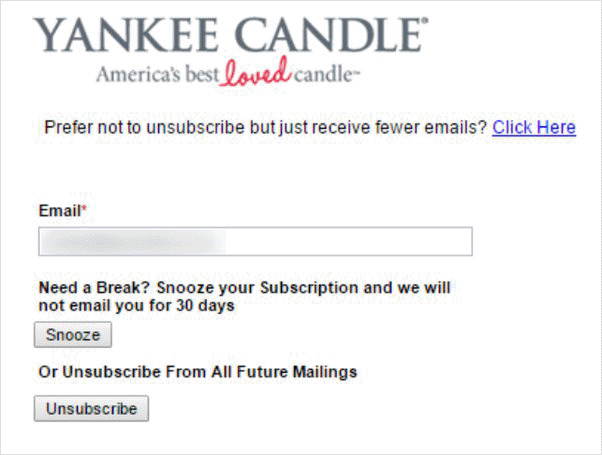
Yankee Candle has a different approach for its email unsubscribe confirmation page. Users can enter their email address and “snooze” emails for 30 days, taking a break from marketing messages.
The design is simple yet effective because people will often forget they paused email updates. Once the 30 days are up, they’ll start getting emails again and may change their mind about removing themselves from the list.
Unsubscribe pages like this are perfect for the busy holiday season, where people are inundated with promotional emails.
8. Wistia
| Strength | What Wistia Does Well |
|---|---|
| Transparency | Shows frequency for each email category |
| Personalization | Users can pick only what’s relevant |
| Subscriber trust | Clear expectations build long-term engagement |
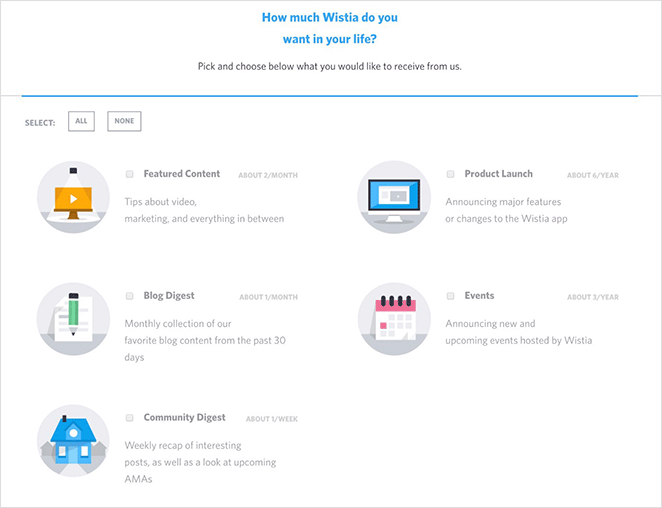
The final email unsubscribe page example comes from Wistia, the video hosting platform. Like several of the other examples on this list, Wistia gives users the option to personalize their emails and only opt-in to specific topics, including:
- Featured content
- Blog posts
- Community digest
- Product launch
- Events
Beside each option is a short description and estimate of how many emails of that type you can expect to receive each month or year. Users can then choose the email frequency and content types that best suit their needs.
What Makes These Unsubscribe Pages Work
After reviewing these 8 email unsubscribe page examples, a few patterns come up again and again. From what I’ve seen, these are the design choices that actually move the needle.
- They offer a real alternative to leaving. The best pages don’t just confirm the opt-out. They give subscribers a reason to stay, whether that’s adjusting frequency, picking content topics, or pausing instead of leaving entirely.
- They use preference and frequency controls as a safety net. Email Uplers, Vimeo, and Wistia all use granular preference centers. Subscribers who would leave to reduce inbox noise stay when they can just turn down the volume instead.
- They use personality and humor when it fits the brand. Jean Scene and Charity: Water show that a light touch can turn a negative moment into a memorable one. It only works when it’s authentic to the brand voice.
- They provide a social media bridge. HubSpot and SeedProd both offer ways to stay connected outside email. Losing a subscriber doesn’t have to mean losing the relationship.
Email Unsubscribe Page Mistakes to Avoid
Just as important as what to include is what to leave out. Some common unsubscribe page patterns are frustrating enough to damage your brand reputation, even after someone has already decided to leave.
- Requiring a login to unsubscribe: This is both a legal risk and a UX failure. Under CAN-SPAM and GDPR, unsubscribing must be easy and require minimal steps. Forcing subscribers to remember a password to leave is the kind of friction that generates complaints.
- Multiple confirmation steps: One confirmation is fine. Two is borderline. Three feels like you’re hoping they give up. Each additional step increases frustration and the chance of a spam report.
- Hiding the unsubscribe link: Tiny grey text on a white background, buried in the footer, set to 8px font. I’ve seen it. It fails legally and it fails your audience. Make the link visible and easy to click.
- Sending a follow-up “why did you leave?” email: If someone just unsubscribed, sending them another email is the one thing guaranteed to turn a clean exit into a complaint. Let them go gracefully.
The goal of a good unsubscribe page is to make leaving easy while giving people a reason to stay. Dark patterns do the opposite, and they leave a worse impression than just a plain confirmation message would.
How to Create an Email Unsubscribe Page
By the end of these 4 steps, you’ll have a fully custom email unsubscribe page in WordPress, with your branding, a resubscribe option, and any re-engagement elements you want to include.

SeedProd lets you design a fully custom unsubscribe page in WordPress without writing a single line of code. You can start from hundreds of professionally designed landing page templates, customize your page visually, and see every change in real time.
The plugin also includes content blocks for opt-in forms, social media icons, call-to-action buttons, and video, all useful for building a page that keeps people engaged even when they’re leaving.
Follow these step-by-step instructions to create an email unsubscribe page with SeedProd.
Step 1. Install and Activate SeedProd
First, click here to get started with SeedProd and download the plugin to your computer.
Note: There is a free version of SeedProd, but we’ll use the Pro version for the advanced features.
Next, install and activate the plugin on your WordPress website. If you need help with this step, you can follow this guide on installing a WordPress plugin.
Once SeedProd is installed, you’ll be able to build your own custom unsubscribe confirmation page inside WordPress.
After installing the plugin, go to SeedProd » Settings and enter your license key.
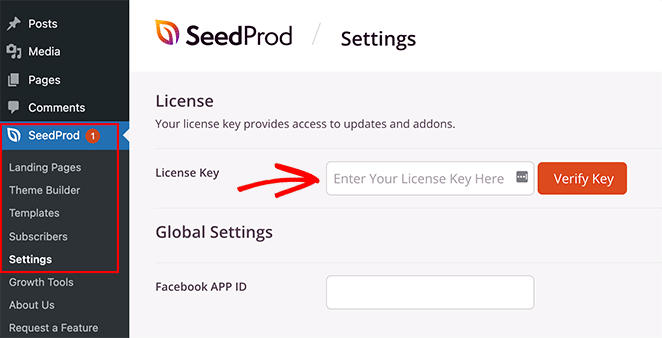
You can find your license key in your SeedProd account under the Downloads section.
Click the Verify Key button and save your settings before moving to the next step.
Step 2. Choose a Landing Page Template
Next, go to SeedProd » Landing Pages and click the Add New Landing Page button.
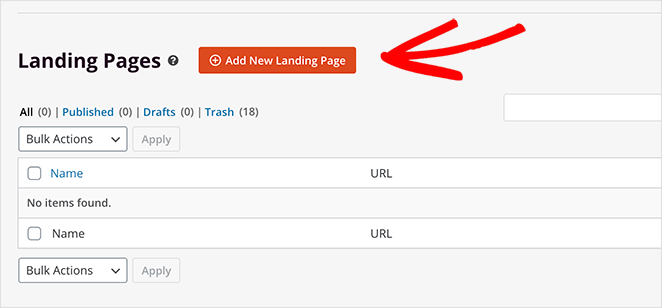
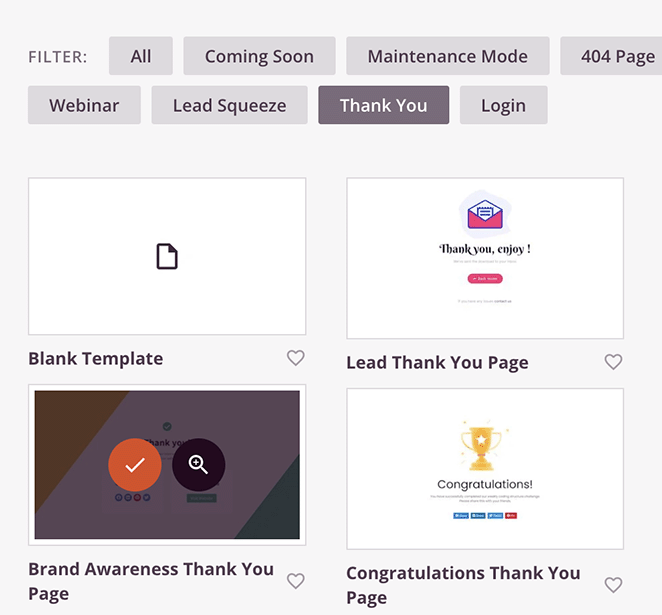
You’ll see many different landing page templates that you can filter by type on the next screen.
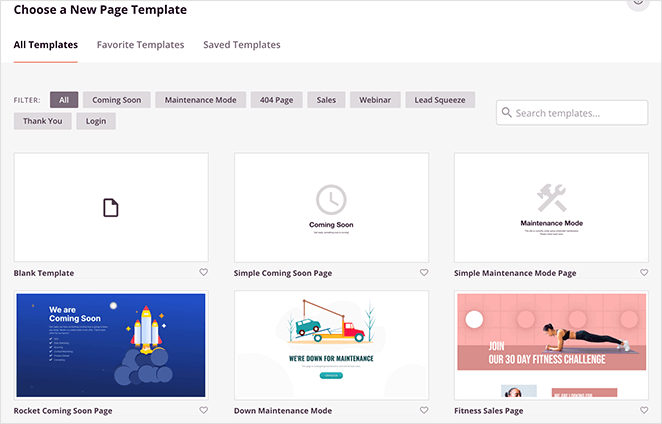
Once you find a template that resembles the type of design you want, hover over the thumbnail and click the checkmark icon.
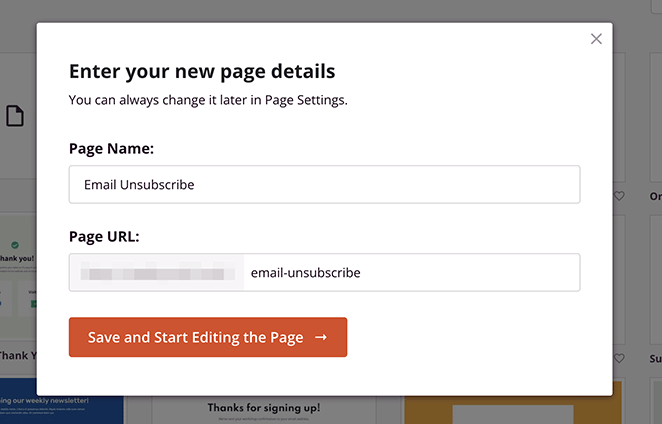
Now you can enter a name and URL for your page and click the Save and Start Editing the Page button to customize it.
Step 3. Customize Your Email Unsubscribe Page
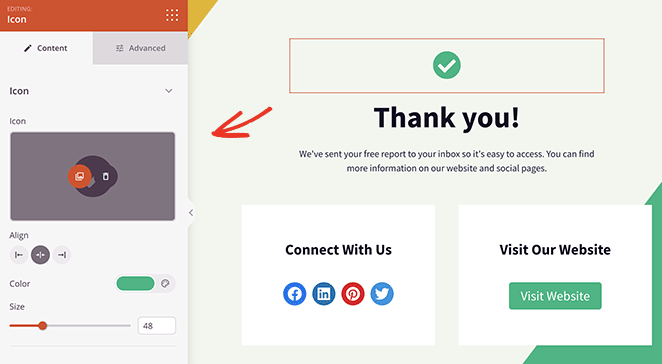
For example, you can click the icon block to remove the checkmark and replace it with a more relevant icon. The block settings panel will open on the left-hand side, and you’ll see a preview of your changes on the right.
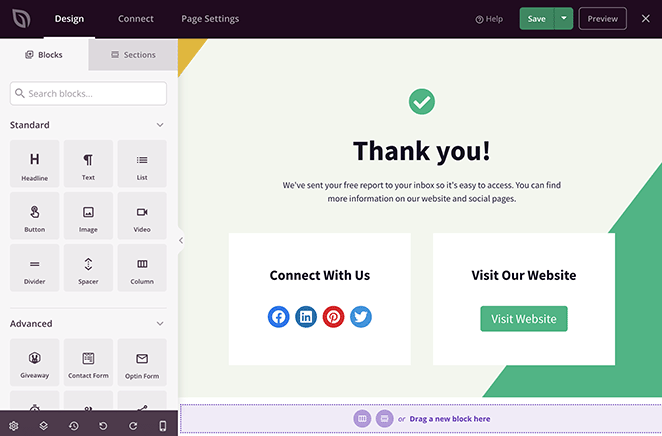
You can also click on any text block to enter a custom message and confirm that users wish to unsubscribe.
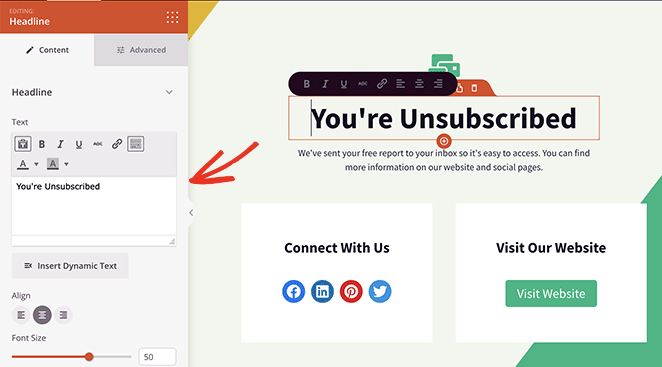
Here are some other ideas for customizing your email preferences page:
- Use the social media icons block so visitors can follow you for updates
- Add a call-to-action button inviting users to check out your latest discounts
- Include testimonials from happy email subscribers
- Use the video block to display an engaging video message
- Customize your background image in the Global Settings panel
I like using the video block here to create a more personal unsubscribe experience. It makes your email opt-out page feel more human and less robotic.
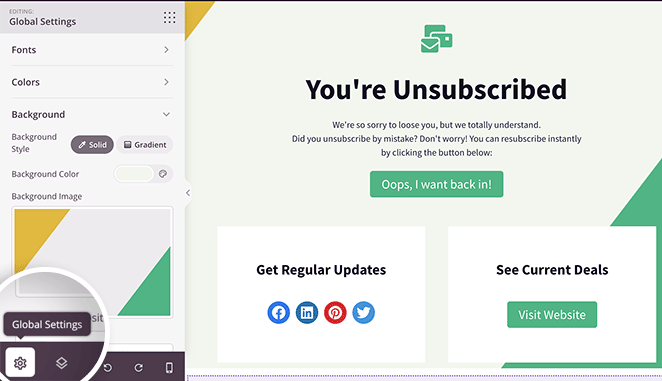
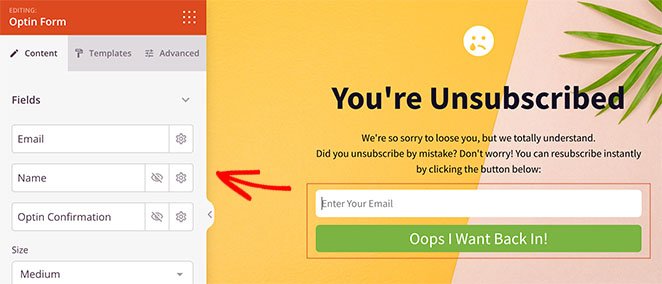
In this example, we added the Optin Form block so users can re-subscribe. Because SeedProd integrates with popular email marketing providers, anyone resubscribing to your list is added automatically.
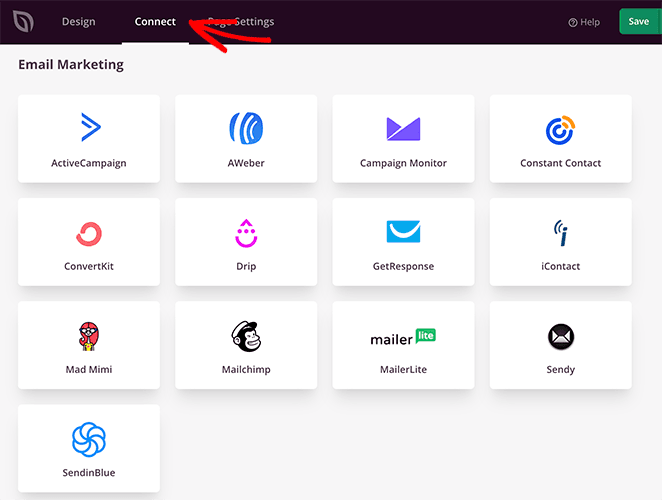
All it takes is clicking the Connect tab at the top of your screen and following the instructions to link your email service.
You can also read our email marketing documentation for instructions on each email integration.
Step 4. Publish Your Email Unsubscribe Page
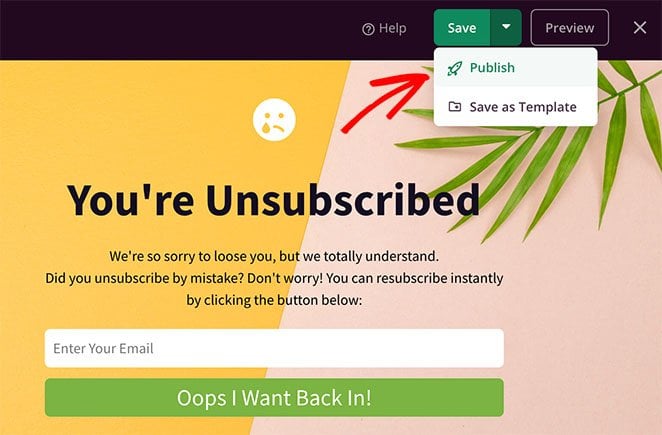
When you’re happy with how your landing page looks, click the Save button in the top-right corner. You can then click the dropdown arrow and select Publish to make your page live.
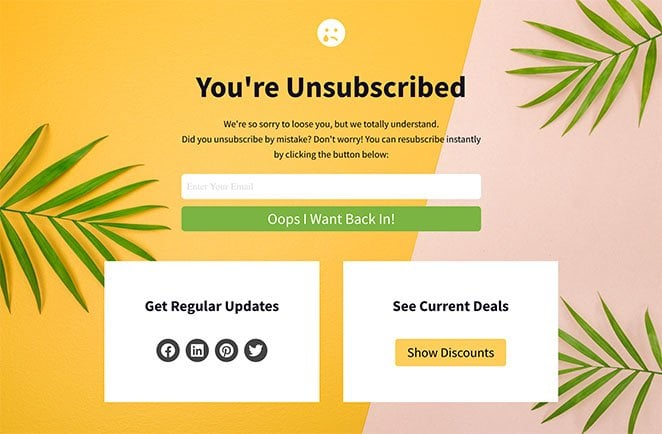
Here’s an example of the email unsubscribe page we made with SeedProd:
All that’s left is to link your page to the unsubscribe link in your emails. Check with your email provider for instructions on the best way to do that because each provider has different settings.
Frequently Asked Questions
What should I put on an email unsubscribe page to keep subscribers?
Give people a reason to stay or a softer alternative to leaving. The most effective options are a resubscribe button for accidental clicks, a preference center to adjust frequency or content type, a pause option for subscribers who need a break, and social media links to stay connected outside email.
From what I’ve seen, pages that offer at least two of these options retain significantly more subscribers than a plain confirmation screen.
How do I create a custom unsubscribe page in WordPress?
Use SeedProd to build a custom unsubscribe page without any code. Install SeedProd, go to SeedProd » Landing Pages, choose a template, and customize it with your unsubscribe message, branding, and re-engagement elements like a video, opt-in form, or CTA button.
Once published, link the page URL to the unsubscribe field in your email marketing provider settings.
What is a preference center and how does it reduce unsubscribes?
A preference center is a page where subscribers can control what they receive from you. Instead of unsubscribing entirely, they can reduce email frequency, choose specific content topics, or opt into only transactional emails.
Many subscribers leave because they’re overwhelmed by volume, not because they dislike your brand. A preference center catches those people before they go.
Does a good unsubscribe page help email deliverability?
Yes, indirectly. A well-designed unsubscribe page that makes opting out easy reduces spam complaints, because frustrated subscribers who can’t find the unsubscribe link mark emails as spam instead.
Fewer spam complaints means better sender reputation with Gmail, Outlook, and other providers, which keeps your emails landing in the inbox rather than the spam folder.
What are the legal requirements for email unsubscribe pages?
Under CAN-SPAM in the US, you must honor unsubscribe requests within 10 business days and cannot require more than visiting a single page or sending a reply email. Under GDPR in Europe, withdrawal of consent must be as easy as giving it, meaning a visible unsubscribe link in every email and a simple process.
You cannot require subscribers to log in to unsubscribe, charge a fee, or make them wait more than 10 days for the opt-out to process.
SeedProd and Your Small Business
Your email unsubscribe page is your last impression. Make it count. If you’re ready to turn that exit screen into something that keeps subscribers engaged, SeedProd makes it straightforward to build and publish.
Get started with SeedProd Today!
You may also find the following guides helpful:
- Best SMTP Plugins for Successful Email Delivery
- How to Write a New Website Announcement Email
- How to Set Up a Professional Free Business Email Address
Thanks for reading! We’d love to hear your thoughts, so please feel free to join the conversation on YouTube, X and Facebook for more helpful advice and content to grow your business.



