
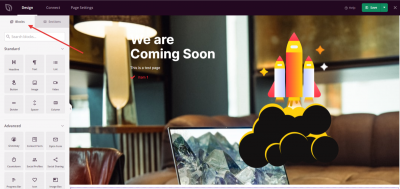
Blöcke sind die Bausteine jeder SeedProd-Seite und jedes SeedProd-Templates. Jeder Block fügt einen bestimmten Inhaltstyp hinzu – Text, Bilder, Formulare, Social-Media-Feeds und mehr –, den Sie per Drag & Drop in Ihr Layout ziehen. Klicken Sie auf den Namen eines Blocks, um dessen vollständige Dokumentation anzuzeigen.
Allgemeine Blöcke
- Akkordeon-Block
- Erweiterter Galerie-Block
- Benachrichtigungsblock
- Anker-Block
- Block für animierte Überschriften
- Vorher-Nachher-Umschaltblock
- Geschäftsrezensionen-Block
- Schaltflächenblock
- Spalten-Block
- Kontaktformular-Block
- Inhaltsumschaltblock
- Countdown-Block
- Zähler-Block
- Benutzerdefinierter HTML-Block
- Trennlinien-Block
- Galerie-Block
- Google Maps Block
- Überschriften-Block
- Hotspot-Block
- Icon Block
- Icon Box Block
- Bild-Block
- Bildbox-Block
- Bildkarussell-Block
- Listenblock
- Login-Formularblock
- Navigationsmenü-Block
- Optin-Formularblock
- Zahlungsbutton (Stripe) Block
- Beitragsblock
- Preislisten-Block
- Preisgestaltungstabellen-Block
- Fortschrittsbalken-Block
- Suchblock
- Shortcode-Block
- Social Profiles Block
- Social Sharing Block
- Abstandsblock
- Sternebewertungsblock
- Inhaltsverzeichnis-Block
- Tabs Block
- Teammitglied-Block
- Testimonials Block
- Text Block
- Video Block
- Video-Pop-up-Block
WooCommerce-Blöcke
- In den Warenkorb Block
- Zusätzliche Informationen Block
- Archivprodukte Block
- Bestseller Produkte Block
- Warenkorb Block
- Checkout-Block
- Vorgestellte Produkte Block
- Menü Warenkorb Block
- Produktinhalt Block
- Produktdaten-Tabs Block
- Produkt-Hauptbild Block
- Produkt-Meta Block
- Produktpreis Block
- Produktbewertung Block
- Produktbestand Block
- Produkttitel Block
- Produkt-Raster Block
- Ähnliche Produkte Block
- Block für aktuelle Produkte
- Block für Sale-Produkte
- Block für Kurzbeschreibung
- Block für Top-bewertete Produkte
- Upsell-Block
- Block für Produktgaleriebilder
Easy Digital Downloads Blöcke
Blöcke für soziale Medien
- Facebook Kommentare Block
- Facebook-Embed-Block
- Facebook Like-Block
- Facebook-Seiten-Block
- Block für X (Twitter) Timeline-Einbettung
- X (Twitter) Tweet-Einbettungsblock
- Block für X (Twitter) Folgen-Schaltfläche
- Block für X (Twitter) Tweet-Schaltfläche
Blöcke für Drittanbieter-Integration
Wiederverwendbare Blöcke
Speichern Sie jeden Block als wiederverwendbare Vorlage, um ihn auf jeder Seite einzufügen, ohne ihn von Grund auf neu erstellen zu müssen. Ausführliche Anweisungen finden Sie unter Erstellen wiederverwendbarer Blöcke für konsistentes Design.
Um einen beliebigen Block zu Ihrer Seite hinzuzufügen, öffnen Sie den SeedProd-Builder und ziehen Sie ihn vom linken Bereich auf Ihre Leinwand. Klicken Sie auf den Block, nachdem Sie ihn platziert haben, um seine Einstellungen zu öffnen und seinen Inhalt, Stil und erweiterte Optionen zu konfigurieren.